
1.5 KiB
1.5 KiB
Nova Poshta: Tracker and Organizer
Main window

The main application window shows all added Numbers (left side), Detailed info (right side). There is also a Log at the bottom of the window showing the main events of the application.
List element
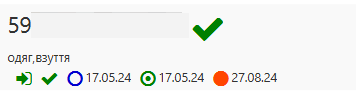
The list item contains basic information about the Number:
- number
- Number's State (new, error, processing, waiting, completed)
- the user's description or comment (if added); If both the description and the user's comment are added, the comment will be shown - the priority of custom editing
- Number's Type (inbound, outbound, undefined)
- Number Status (i.e. Completed), Date of Creation, Date Adding to the application, Last Update Date
Detailed view

The detailed view shows all the Number's main fields. Detailed view is almost completely duplicated (except for increased Number status) the List element There are also buttons that allow you to copy the text to the system clipboard and the opening Detailed view window button, where all Number's data is shown.
Context menu
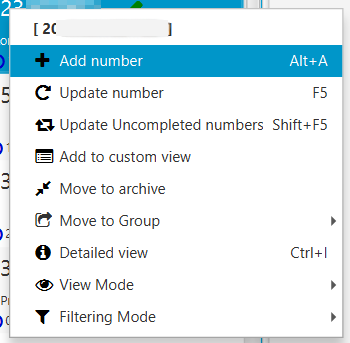
The Context menu of the List element main Number's commands are contained Also those commands contains in the Menu and in the Toolbar.